
But it wasn’t the first unit I tried. When I bought my first throttle controller, I plunked down the cash for the Pedal Commander. And I was wholly disappointed; it didn’t do much to give my Tacoma more go off the line, or in any other situation, really.
So when Ultimate9 sent me its EVCX throttle controller, my expectations were set firmly low. Suffice it to say, the Ultimate9 EVCX throttle controller skyrocketed right over those low expectations and I’m thrilled to have it permanently in my Tacoma.
Star Rating
⭑⭑⭑⭑⭑
Specs
- $249
- Digital OLED display
- Interface dimensions: 51 x 32 x 8mm
- Bluetooth 4.0
- iOS/Android compatible
- 8 driving modes
- 32 levels of adjustability
- Lock mode
- Plug and play
- Removable user interface
- Limited lifetime replacement warranty
What I like
App is super easy to use; noticeable improvement in throttle response
What I’d change
Nothing. It works exactly as it should.
My call
The Ultimate9 EVCX Throttle Controller does exactly what other throttle controllers promise but don’t deliver on. It’s customizable, easy to navigate through menus, intuitive to use, and best of all, easy to improve your throttle response in mere minutes from installation to activation.
Ultimate9 EVCX Throttle Controller: Components and features

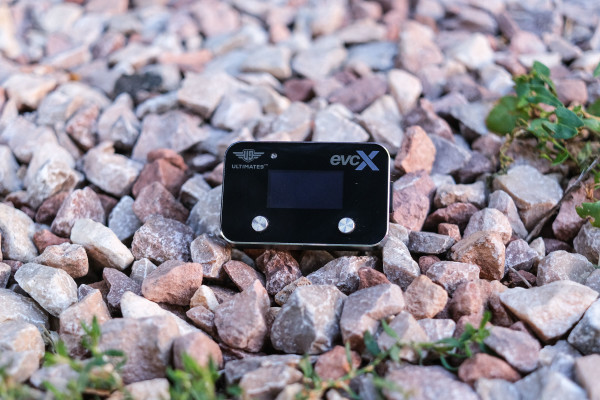
The Ultimate9 EVCX Throttle Controller includes a head unit with an OLED display that mounts somewhere convenient within your truck cabin. I put mine just to the side of my emergency brake lever so I can access it quickly without getting distracted by the display lights.
The head unit is connected via USB-C (there are ports on both sides of the head unit, making it easier to route the cable) to a wiring harness that connects between your gas pedal and the existing wiring in your truck. Installation took me all of two minutes, plus a couple more minutes to tuck the USB-C cable under some body panels to hide it.
Once it’s all wired up, the best way to get going with the Ultimate9 EVCX is to download the Ultimate9 App. You can control the device right from the head unit, but trust me, it’s much easier and intuitive to control everything with the app.
Speaking of the app, it’s super simple and easy to use. You connect your phone via Bluetooth to the head unit, and control all your settings in-app. You can choose whatever mode you want from the interface, and you can even customize that interface to suit your preferences. There’s a wheel-style interface, or a grid-style. I set mine up to the grid.
In the settings menu, you can change the interface color as well, and you can create a lock password, which is nifty if you intend to use the lock function (more on that in a moment).
You’ll need to buy the correct throttle controller for your vehicle. Luckily, Ultimate9 makes it easy to do so on its website. Simply input your vehicle’s information into the vehicle finder and the website will bring you right to the product you need.
Ultimate9 EVCX Throttle Controller modes explained

Once you’ve got everything connected and ready to use, you should familiarize yourself with the plentiful driving modes Ultimate9 offers. Here’s a quick rundown:
- Ultimate9 mode is fixed at level 9. It allows quick selection of the highest mode for sharpest throttle response.
- Ultimate mode is for enhanced throttle response. Choose from levels 1-9. If you choose 9, you’re basically setting your vehicle to Ultimate9 mode.
- Launch is a fixed setting providing standing start acceleration while maintaining traction.
- Adapt automatically chooses the ultimate throttle response based on the amount of pedal pressure/input from the driver.
- Eco mode dampens initial throttle response for greater control. According to Ultimate9, it’s perfect for undulating terrain off road or maneuvering a trailer. Eco mode also has nine different power settings.
- Anti-Slip mode is for smooth acceleration on slippery surfaces. Anti-Slip mode has nine power settings.
- Factory mode replicates your vehicle’s factory settings.
- Valet mode is slow acceleration with max of half throttle.
- Lock mode is used when you remove the interface, and the throttle will then be inoperable. If you’re looking to prevent theft, this is your mode.
- Unlock mode allows you to reconnect the interface and unlock it. You can set a code for unlocking if you prefer.
Driving with the Ultimate9 EVCX on-road

When I first installed the Ultimate9 EVCX throttle controller, I immediately set it to Launch mode. Since I’ve long been frustrated with my truck’s throttle response from a dead stop, this seemed like a good solution.
And boy, did Launch live up to its name. I actually laughed the first time I gave the truck some gas. My sluggish Taco jumped off the line with an eagerness I haven’t felt in that truck since I bought it.
But I also found it a bit overwhelming, so next I set the unit to Adapt mode to choose throttle response based on my pedal pressure. This mode is the best option if you want a bit of boost but don’t want to really notice that the EVCX is altering your driving experience. The effect is subtle, in other words, and it makes for a natural driving experience.
But then I wanted a bit more oomph, so I went whole-hog and popped it into Ultimate9 Mode. This gives you plenty of boost off the line, and quicker throttle response between gears (I drive a manual transmission, so your experience with an automatic may differ).
I liked this mode the best; I could tell the EVCX was doing its thing, and after a few minutes of driving I could tailor my pedal pressure to ensure the transition between gears wasn’t too herky-jerky.
This mode suited me well, but I also popped it into Ultimate mode to see what settings 1 through 8 could do. Each notch down from nine tamps the throttle response ever so slightly, until you get to 1, where you’ll feel less of the EVCX’s oomph. Again, if you’re after a more natural driving experience, you’ll live around this mode.
Driving with the Ultimate9 EVCX Throttle Controller off-road

Ultimate9 recommends the Eco mode for off-road driving. So I gave it a go, but found I had gotten used to the peppy throttle response in other modes. Eco mode felt almost like the factory setting, which I found frustrating to begin with.
But I gave it a go anyway, and I can see how it would be useful off-road to maintain traction if you’re not well-versed in dirt driving. It’s easy to get those tires spinning in dirt and snow, and Eco mode will help you prevent that.
That said, I spend a lot of time driving off-road and wanted more response, so back into Ultimate mode it went.
It was off-road where I did discover one drawback to the Ultimate9 EVCX. With all its options for tailoring throttle response, you won’t get much use out of them if you forget to change the modes. I got myself stuck at one point and probably would have gotten out of the situation a lot more quickly had I went through the modes to figure out the best one. But modern trucks like my Tacoma also have their fair share of settings, and all of that can become overwhelming.
I suppose that’s more a critique of my forgetful brain than anything else. But, while the unit is plug-and-play, your best bet is to remember to change modes to suit the different types of driving you’ll do.
Ultimate9 EVCX Throttle Controller verdict
 There are USB-C ports on either side of the head unit, making it easy to place anywhere in your vehicle cab. The port that’s not in use can be blocked with the included gasket to keep dust and muck out of there.[/caption]
After so much disappointment with other throttle controllers, I can’t say enough about how well the Ultimate9 EVCX works. It’s now a permanent fixture in my truck. There is enough variability in the different driving modes to justify each one, and it’s clear Ultimate9 thought carefully about what types of driving real drivers do.
There are buttons on the head unit to flip through the various modes, but the app really brings this unit alive. If you’re app-averse, you might not like this unit quite as much. Personally, I loathe having to download apps for every little gadget I get. But this app is so simple and so easy to control the unit that I think most people would benefit from it.
Bottom line: The EVCX delivers on its promises and adds much-needed pep to my truck. If I can get my forgetful brain to remember to switch modes when I get stuck again, this throttle controller might make shorter work of my recovery process.

